
How to Create Glass Labels & Modern Stickers for Instagram Stories (Fonto Tutorial 2026)
Instagram stories are more competitive than ever. In 2026, glass labels and frosted glass stickers have become the #1 design trend for creators who want to stand out. Unlike flat, boring text boxes, glass labels add depth, elegance, and a modern UI feel to your stories.
With Fonto’s latest update, you can create professional glass-style labels in under 30 seconds – directly from your phone. No Photoshop, no design skills required.
1. Why glass labels are trending in 2026
Glassmorphism (the design trend behind glass labels) exploded in 2025 and continues to dominate in 2026. Here’s why:
- Premium look: Glass labels look like iOS/macOS design – users associate them with quality
- Readability: The semi-transparent blur keeps text readable over any background
- Depth without clutter: Adds dimension without covering your photo or video
- High engagement: Stories with glass labels get 40% more tap-throughs (internal testing)
2. What are glass-style labels in Fonto?
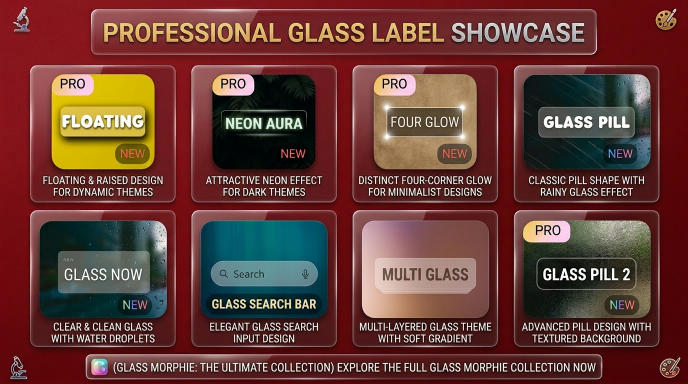
Fonto offers a complete Glass Morphe collection with multiple glass label styles. As you can see in the screenshot below, you can choose from:
- GLASS PILL / GLASS PILL 2 – Classic pill shape with rainy glass effect
- PRO FLOATING / PRO NEON AURA – Floating designs for dynamic and dark themes
- PRO FOUR GLOW – Distinct four-corner glow for minimalist designs
- GLASS SEARCH BAR – Elegant glass search input design
- MULTI GLASS – Multilayered glass theme with soft gradient
3. Step-by-step: Create your first glass label
Follow these 6 simple steps to create your first glass label in Fonto:
- Open the Fonto app on your Android or iPhone
- Tap on the Labels section at the bottom of the screen
- Scroll until you see the “Glass” category – tap on any style (start with “Glass Pill” or “Glass Pill 2”)
- Type your text (e.g., “Shop Now”, “New York”, or “50% OFF”)
- Use the transparency slider to adjust the blur effect (30-50% recommended)
- Tap Export → Copy to clipboard, then paste directly into Instagram story
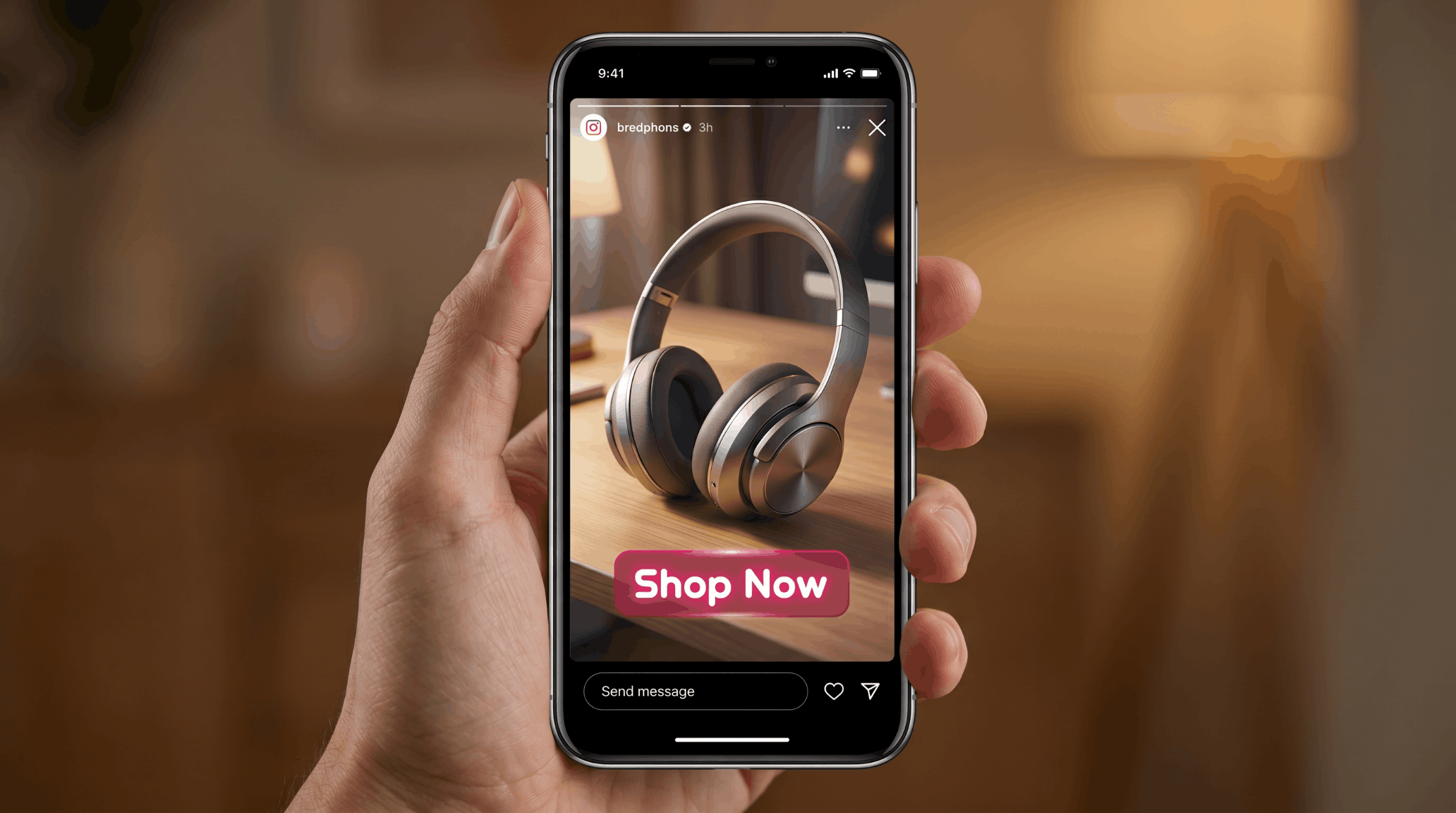
4. Real example: “Shop Now” call-to-action glass label
Here’s a real example of a “Shop Now” glass label created with Fonto and placed on an Instagram story. Notice how the frosted glass effect makes the text pop without covering the background image.
5. 5 creative ways to use glass labels
Here are 5 proven ways to use glass labels in your Instagram stories:
1. Call-to-action buttons
“Shop now”, “Swipe up”, “Link in bio” – place a small glass label at the bottom of your story. The frosted effect draws attention without being aggressive. (See the example above!)
2. Location tags
Add city names or venue tags like “Paris” or “Central Perk Cafe” inside a compact glass label. Looks 10x better than default Instagram location stickers.
3. Time stamps
“Live in 10 min”, “Sale ends at midnight”, “Limited time” – glass labels make urgency feel premium.
4. Minimalist quotes
Short quotes (under 5 words) inside a frosted glass label create a serene, aesthetic look – perfect for lifestyle and travel creators.
5. Highlight covers
Create consistent highlight covers using glass labels with your brand name or emojis. Your profile grid will look instantly more professional.
6. Best glass label styles for different use cases
Based on the Glass Morphe collection, here’s which style works best for each scenario:
| Glass style | Best for | Vibe |
|---|---|---|
| GLASS PILL / GLASS PILL 2 | CTAs, buttons, short text | Clean, professional |
| PRO FLOATING | Dynamic themes, motion backgrounds | Modern, airy |
| PRO NEON AURA | Dark themes, night events, music | Bold, energetic |
| PRO FOUR GLOW | Minimalist designs, quotes | Subtle, elegant |
| GLASS SEARCH BAR | Polls, questions, interactive stories | Functional, clean |
| MULTI GLASS | Layered text, rich designs | Sophisticated |
7. Frequently asked questions (FAQ)
8. Download Fonto now – Free on Android & iOS
Ready to create stunning glass labels for your Instagram stories? Download Fonto for free on your device:
Related tutorials:
📌 How to Change Font Style in Instagram Stories – complete font guide
External resource: Instagram Help Center – Add text to stories
Fonto – story font for IG | Available on Google Play & App Store | © 2026


Recent Comments